Getting Started with Salesforce Indicators
See Install Salesforce Indicators if you have not already installed Salesforce Indicators.
More to Come!
Salesforce Indicators at the moment is one Component - the Indicator Bundle. The Indicator Bundle requires setting up via Salesforce Custom Metadata Records. We are currently working on a new UI which will make setup of the Indicator Bundle much easier, but it is still a while away. We also have two new Components planned - the Grid and the Panel. See How to Volunteer if you would like to help us build out these exiting new features.
Structure of Salesforce Indicators
This is how the 4 Salesforce Indicators Custom Metadata Objects work together set up the Indicators.
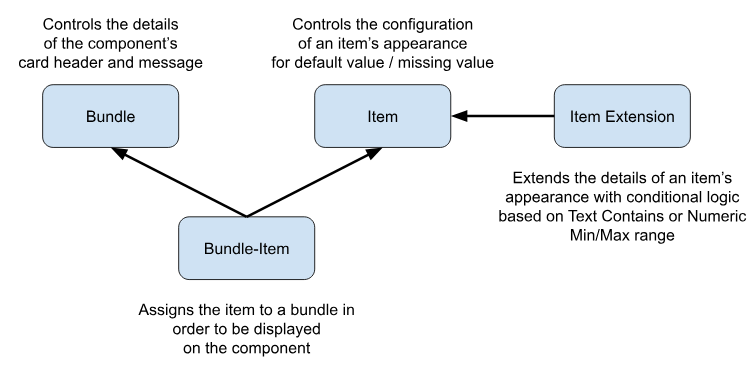
- Indicator Item defines what value or icon to display. The basic setup allows for an icon to be displayed if the selected field is entered, or blank.
- Indicator Item Extension defines conditional display of icons based on specific field values, such as a different icon for Hot, Warm, or Cold. Can include text comparisons, date ranges, and value ranges.
- Indicator Bundle Item places an Item in a Bundle and controls the order of the Item in the Bundle. This allows one Indicator Item to be displayed in multiple Bundles.
- Indicator Bundle groups Indicator Items specifically for one object and your desired use case. The Indicator Bundle is added to the Lightning Record Page and can be configured further for different display options. Multiple Bundles can be created for each Object, and conditionally displayed on the Lightning Record Page using Component Visibility.
The Indicators configuration is stored as deployable Custom Metadata, so it can deployed between orgs, and works in a Sandbox.
Sample Use Cases for Salesforce Indicators
See Recipes for ideas of different Indicators to use in your Org.
Use the Samples
In Progress
This page needs to be extended describing the [Sample Indicators] and [Training Indicators] and including screen shots and videos.