Calling DLRS from Flow
While DLRS provides native scheduling and record-based triggers, there may be scenarios where you want more control over how and when your rollups recalculate. In these cases, calling DLRS directly from Flow can provide greater flexibility.
Using DLRS in Flows
- Review the Rollup that will be called by the Flow:
- You’ll need to take note of two details:
- The rollup’s API Name
- The parent object being used
- It’s also important to review the rollup’s Calculation Mode:
- If the rollup should only be triggered by flow, use Invocable by Automation.
- Other Calculation Modes can be used, but keep in mind that there’s an increased risk that recalculation could fail if the rollup is called multiple ways at the same time.
- For example, if you have a rollup with the realtime calculation mode, a scheduled nightly flow would be relatively safe while a record-triggered flow would be more likely to run into issues.
- For example, if you have a rollup with the realtime calculation mode, a scheduled nightly flow would be relatively safe while a record-triggered flow would be more likely to run into issues.
- You’ll need to take note of two details:
- Create the Flow:
- DLRS can be called from any flow type that allows apex action elements.
- For example, apex action elements can be added to after-save record-triggered flows, but not before-save.
- In addition, your flow will need to provide DLRS with the ID or IDs of the parent object records you want to recalculate rollup values for.
- The DLRS action accepts one parent object ID at a time, so if you have a collection of IDs, you’ll need to use a loop to pass records to DLRS for recalculation.
- The DLRS action accepts one parent object ID at a time, so if you have a collection of IDs, you’ll need to use a loop to pass records to DLRS for recalculation.
- DLRS can be called from any flow type that allows apex action elements.
- Add the DLRS Action:
-
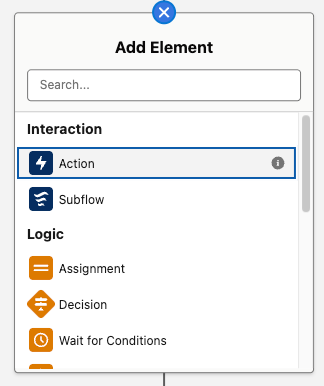
Click the icon to add a new element to the canvas, then select the Action option.
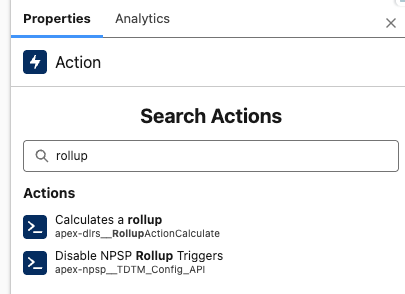
- Search for the action labeled “Calculates a rollup”:
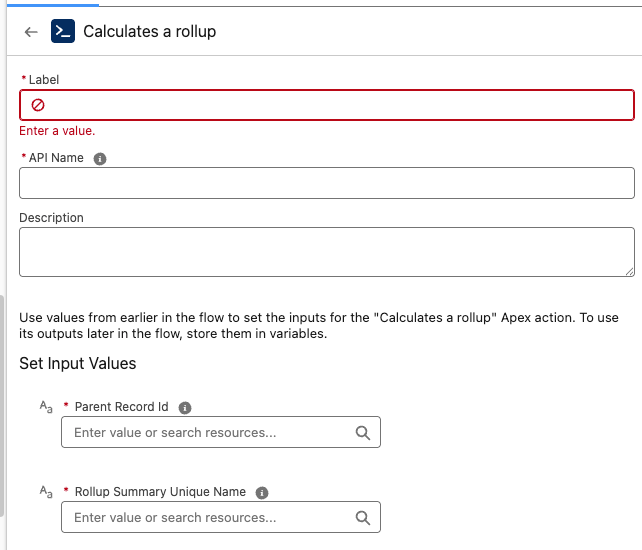
- Configure the action by entering the two required Input Values:
- Parent Record ID: Supply a record ID variable (make sure this is using the same parent object as the rollup).
- Rollup Summary Unique Name: Paste the Lookup Rollup Summary API Name of the rollup that should be recalculated for the supplied parent record.
-
- Test your flow
- When debugging the flow, you’ll be able to see whether the “Calculates a rollup” action successully completed.
- However, the debug panel won’t show what updates were made to record fields by any called DLRS rollups. We recommend testing with an active flow in a sandbox environment in order to confirm you’re seeing the expected updates to your rollup’s target fields.
Use Cases
More Efficient Date-based Recalculation
Standard DLRS triggers only fire when a child record is edited or deleted. If you have rollups with time-based criteria, you may need to recalculate them at specific times even though the child records haven’t been changed. One option to handle this is to schedule a full recalculation job, but another is to use a scheduled flow. This can allow you to recalculate just the records that need updates rather than running the rollup for every parent record in your system.
- Example: A rollup counting “Active Memberships” where membership expires based on a date. The rollup won’t update automatically when that date passes.
- Solution: A nightly Scheduled Flow that finds parent records with expiring memberships and triggers DLRS recalculation.
Trigger from Formula Field Changes
DLRS doesn’t trigger from changes to a formula field. Record-triggered flows also can’t trigger directly from formula fields, but they can run based on changes to the fields the formula is based on.
- Solution: Use a Record-Triggered Flow to reference fields that are part of the formula.
Rollup Dependencies on Non-Child Related Objects
You may want to trigger recalculation of a parent record rollup based on changes to records other than the child records being rolled up. Calling DLRS from Flow can allow more flexibility.
- Solution: Use a Record-Triggered Flow from a third object to call the DLRS action for parent records you want to recalculate.
Special thanks to the DLRS team at the January 2026 Virtual Sprint for contributing to this page
- Amber Crispin
- Megan Lutz
- Quratulain Tariq
- Erica Wong
- Kyle Broeckel